






4:3 vs 16:9 Aspect Ratio: Which Is Better?
Table of Contents
4:3 and 16:9 are the two most common aspect ratios in commercial LED displays. The choice affects content compatibility, cabinet configuration, structural cost, and how the screen looks in its physical space.
The difference usually comes down to content source, viewing environment, and whether the screen will display legacy 4:3 material or modern widescreen video. This guide compares both ratios in practical terms and gives you a direct answer for your project.
1. What Is Aspect Ratio?
Aspect ratio is the proportional relationship between a screen’s width and its height. A 4:3 screen is four units wide for every three units tall. A 16:9 screen is sixteen units wide for every nine units tall.
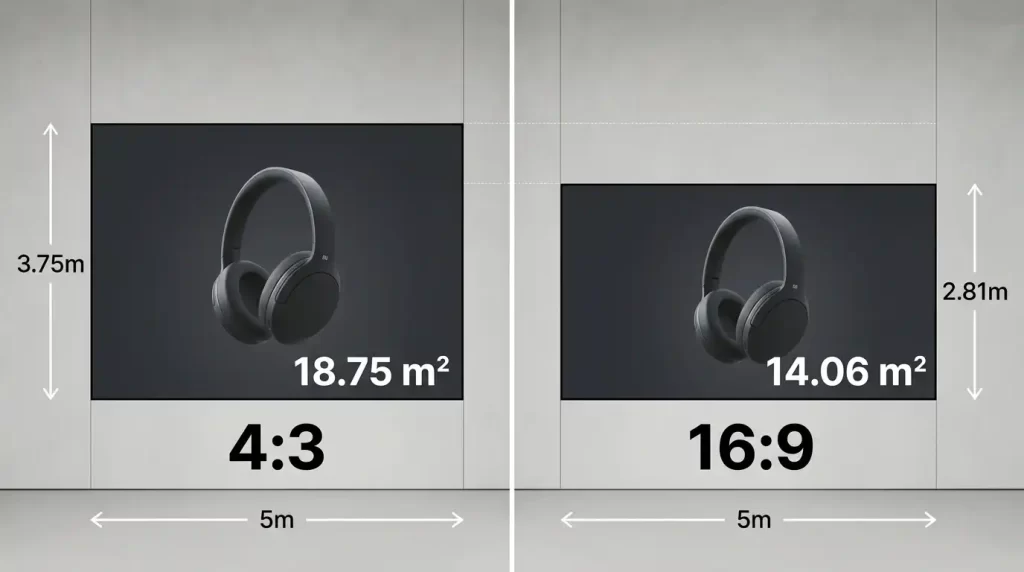
For the same screen width, a 4:3 display is 33% taller than a 16:9 display. That extra height means more LED modules, more cabinet rows, more structural steel, and higher total cost. This is not a minor detail—it is often the single largest cost difference between two otherwise identical projects.
| Specification | 4:3 Aspect Ratio | 16:9 Aspect Ratio |
|---|---|---|
| Width-to-height ratio | 1.33:1 | 1.78:1 |
| Common resolutions | 1024×768, 1400×1050, 2048×1536 | 1920×1080, 3840×2160 |
| Screen height at 5m width | 3.75 m | 2.81 m |
| Surface area at 5m width | 18.75 m² | 14.06 m² |
| Content ecosystem | Legacy, specialized | Universal standard |
| Cabinet availability | Limited; often custom | Widest; standard 16:9 cabinets |
2. 4:3 vs 16:9: Key Differences
2.1 Physical Dimensions and Cost
A 4:3 screen of the same width contains 33% more surface area. At 5 meters wide, a 4:3 wall is 18.75 m² while a 16:9 wall is 14.06 m². That additional 4.69 m² translates directly into more LED modules, more power supplies, more receiving cards, and a heavier support frame. Hardware cost increases by approximately 30–35%.
2.2 Content Compatibility
16:9 is the native format for virtually all modern video: broadcast, streaming, corporate presentations, and digital signage templates. A 16:9 LED wall displays this content without scaling, cropping, or black bars.
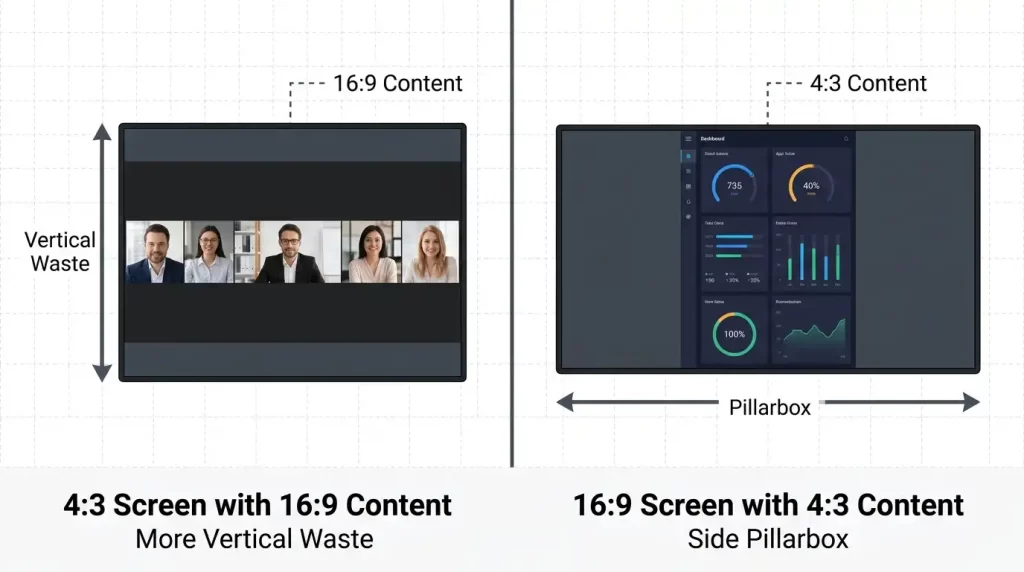
4:3 content still exists in specific environments: legacy SCADA interfaces, older presentation files, and certain house-of-worship lyric systems. If your content is 4:3 native, a 4:3 screen displays it perfectly. But if you plan to show modern video on a 4:3 screen, you will see black bars on the top and bottom—a visible compromise.
2.3 Cabinet Manufacturing
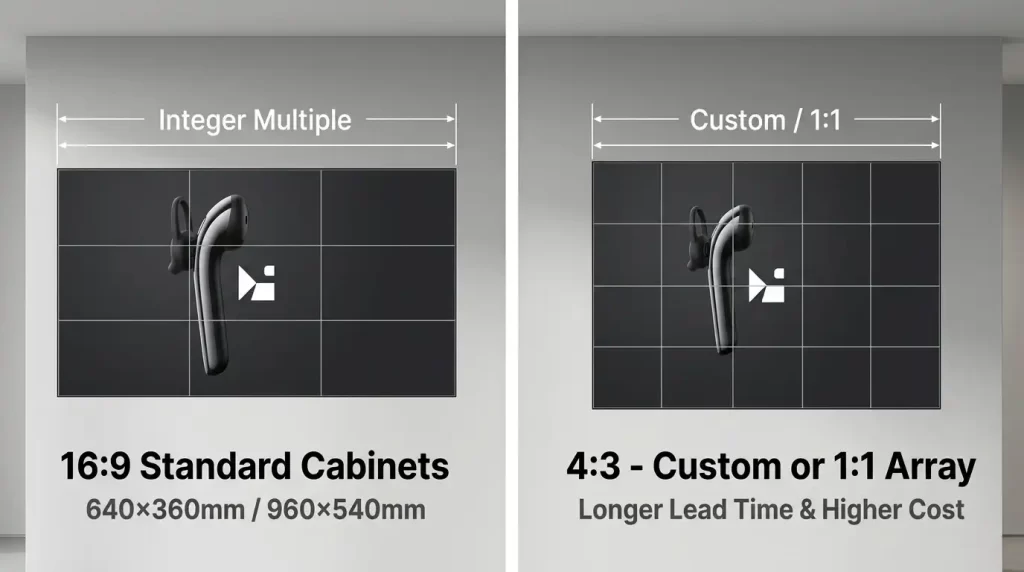
Most LED cabinet manufacturers produce 16:9 cabinets as standard: 640×360mm, 960×540mm, and similar dimensions. Building a 16:9 wall is a simple integer multiplication of these cabinets. Building a 4:3 wall requires either custom cabinet sizes or a 1:1 tile configuration assembled into a 4:3 grid. Custom sizes add lead time and cost; 1:1 tiles solve the geometry problem but may not match the efficiency of purpose-built 16:9 cabinets.
3. Which Is Better for LED Displays?
For the vast majority of commercial LED display projects in 2026, 16:9 is the correct specification. It matches the content ecosystem, uses standard cabinets, integrates with every processor and media player, and costs less than a 4:3 screen of the same width.
The 4:3 ratio remains relevant only for three scenarios:
- Legacy system replacement where the physical opening and software interfaces are already designed around 4:3.
- Architectural constraints where the wall opening or stage proscenium is fixed at 4:3 dimensions.
- Niche content sources that are natively authored in 4:3, such as certain medical imaging or radar displays.
If you are building new and your content is modern, choose 16:9. If you are replacing an existing 4:3 system and the surrounding infrastructure depends on those dimensions, match what is already there.
4. How Aspect Ratio Affects Viewing
4.1 Viewing Distance and Immersion
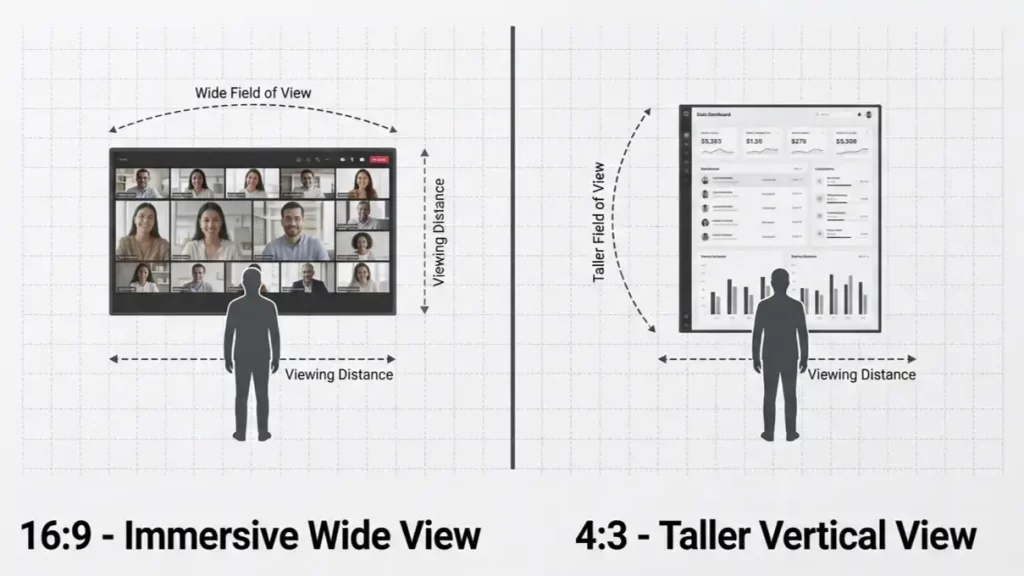
A 16:9 screen at a given width provides a wider field of view for widescreen content, which is more immersive for video playback. A 4:3 screen is taller, which can be advantageous for displaying vertical content like dashboards, data columns, or architectural plans.
4.2 Black Bars and Perceived Quality
When 16:9 content is displayed on a 4:3 screen, black bars appear at the top and bottom. This reduces the effective image area and can make the screen look smaller than its physical dimensions. When 4:3 content is displayed on a 16:9 screen, pillar-boxing occurs with black bars on the sides. Neither situation is ideal, but 16:9 content on a 4:3 screen wastes more vertical space because the bars are larger relative to the image.
4.3 Resolution and Pixel Density
Aspect ratio does not determine resolution, but it affects how resolution is distributed. A 4:3 screen with the same pixel pitch as a 16:9 screen will have more vertical pixels. This can be beneficial for data-heavy content but adds cost without improving widescreen video performance.
5. 4:3 vs 16:9 for Commercial Use
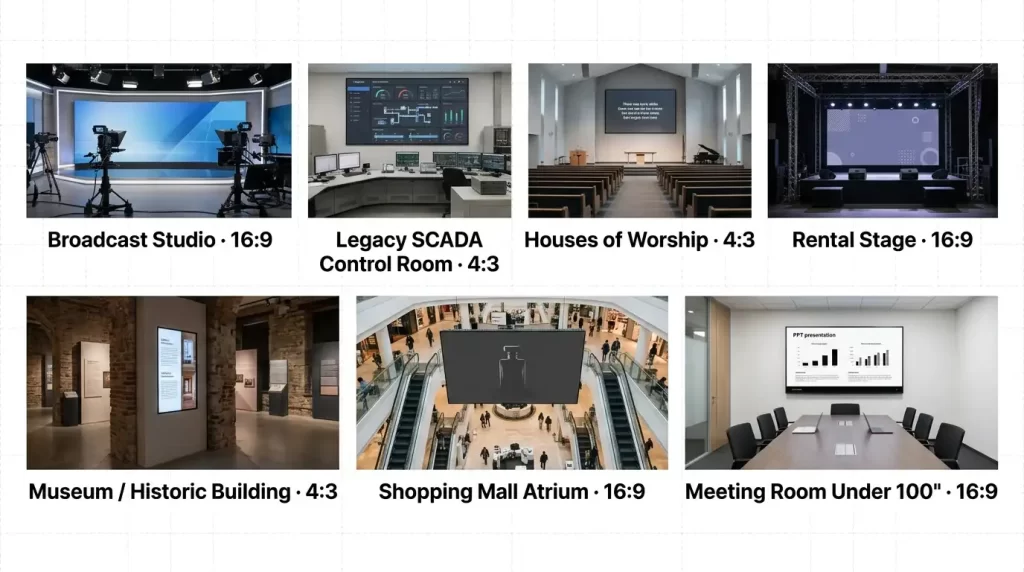
| Application | Recommended Ratio | Primary Reason |
|---|---|---|
| Corporate lobby or retail storefront | 16:9 | Matches modern branding content and video |
| Broadcast studio or virtual production | 16:9 | Matches camera output and industry standards |
| Control room with legacy SCADA systems | 4:3 | Native match to existing software interfaces |
| House of worship with older lyric software | 4:3 | Avoids letterboxing and preserves layout |
| Rental stage for mixed events | 16:9 | Default for most event content; widest cabinet availability |
| Museum or heritage venue retrofit | 4:3 | Physical opening dictates dimensions |
| Shopping mall atrium | 16:9 | Modern advertising content and video |
| Conference room under 100 inches | 16:9 | Standard for presentations and video calls |
6. How to Choose the Right Aspect Ratio
Work through these questions in order:
6.1 What is the native aspect ratio of your primary content?
If 90% or more of your content is 16:9, choose 16:9. If the majority is 4:3 legacy material, choose 4:3.
6.2 Does the physical space constrain the dimensions?
If the wall opening or architectural frame is fixed, measure it and match the closest standard ratio.
6.3 Is this a new installation or a replacement?
New installations should default to 16:9 unless a specific 4:3 requirement exists. Replacements should match the existing ratio to avoid redesigning surrounding infrastructure.
6.4 What is the budget sensitivity?
A 4:3 screen of the same width costs 30–35% more. If budget is tight and content is modern, 16:9 is the efficient choice.
7. Aspect Ratio and LED Display Resolution
Aspect ratio and resolution are separate specifications, but they interact in practice. The table below shows common resolutions mapped to each ratio.
| Aspect Ratio | Common Resolutions | Typical LED Wall Size at P2.5 | Best For |
|---|---|---|---|
| 4:3 | 1024×768, 1400×1050, 2048×1536 | 2.56×1.92 m, 3.50×2.63 m, 5.12×3.84 m | Legacy data, control rooms, retrofits |
| 16:9 | 1920×1080 (Full HD), 3840×2160 (4K UHD) | 4.80×2.70 m, 9.60×5.40 m | Modern video, corporate, retail, broadcast |
When specifying an LED wall, determine the target resolution first, then calculate the physical dimensions using pixel pitch. For a 16:9 Full HD wall at P2.5, the screen must be 4.80 m × 2.70 m. For a 4:3 XGA wall at the same pitch, the screen would be 2.56 m × 1.92 m. The aspect ratio dictates the shape; the pixel pitch and resolution dictate the size.
8. Conclusion
For the vast majority of commercial LED display projects in 2026, 16:9 is the correct specification. It matches the content ecosystem, uses standard cabinets, integrates with every processor and media player, and costs less than a 4:3 screen of the same width. The 4:3 ratio remains relevant only for legacy system replacement, fixed architectural openings, and niche content sources that are natively authored in that format.
The practical rule: if you are building new and your content is modern, choose 16:9. If you are replacing an existing 4:3 system and the surrounding infrastructure depends on those dimensions, match what is already there. Do not choose 4:3 for a new installation simply because it was once the standard—that standard has moved on.
MPLED supplies commercial LED display solutions in standard 16:9 cabinet configurations for corporate, retail, broadcast, and rental applications, as well as custom cabinet sizes for projects with specific dimensional requirements. The product lineup includes indoor fine-pitch video walls, outdoor high-brightness displays, and rental panels, backed by factory-direct pricing and regional warehouses in Japan, Canada, the United States, Italy, Poland, Spain, and Germany. To specify the right aspect ratio and cabinet configuration for your project, contact MPLED for a direct consultation and quote.
FAQ
Q1: Can I display 4:3 content on a 16:9 LED wall without black bars?
You can stretch the image to fill the screen, but this distorts proportions—circles become ovals and faces appear wider. You can crop the top and bottom, but this removes content. The only distortion-free option is pillar-boxing: black bars on the left and right sides. For occasional 4:3 content, this is acceptable. For primary 4:3 content, a native 4:3 screen is the better choice.
Q2: Is a 4:3 LED wall more expensive than 16:9?
Yes, for the same width. A 4:3 screen is 33% taller, which means more LED modules, more cabinet rows, a heavier support structure, and higher installation labor. At 5m width, a 4:3 screen costs approximately 30–35% more in hardware alone.
Q3: Why are most LED cabinets built in 16:9?
Because 16:9 is the global standard for video content. Manufacturers optimize production around the ratio that serves the largest market. Standard 16:9 cabinets—640×360mm, 960×540mm—allow integrators to build common screen sizes with simple integer multiplication, reducing custom engineering and lead time.
Q4: Can I build a 4:3 screen using 16:9 cabinets?
Not precisely. The math does not produce a clean 4:3 grid from standard 16:9 cabinets. You would need to cut modules, which voids warranty, or use 1:1 square tiles assembled into a 4:3 configuration. The 1:1 tile approach is the professional solution for custom ratios.
Q5: Which ratio is better for a church LED wall?
It depends on the church’s existing content. If the church uses modern worship software with 16:9 native output, choose 16:9. If the church is replacing an older 4:3 projection system and the lyric software, stage opening, and seating layout were designed around 4:3, matching that ratio avoids a costly redesign.
